Xray Arc Raiders Cheat
Minimal
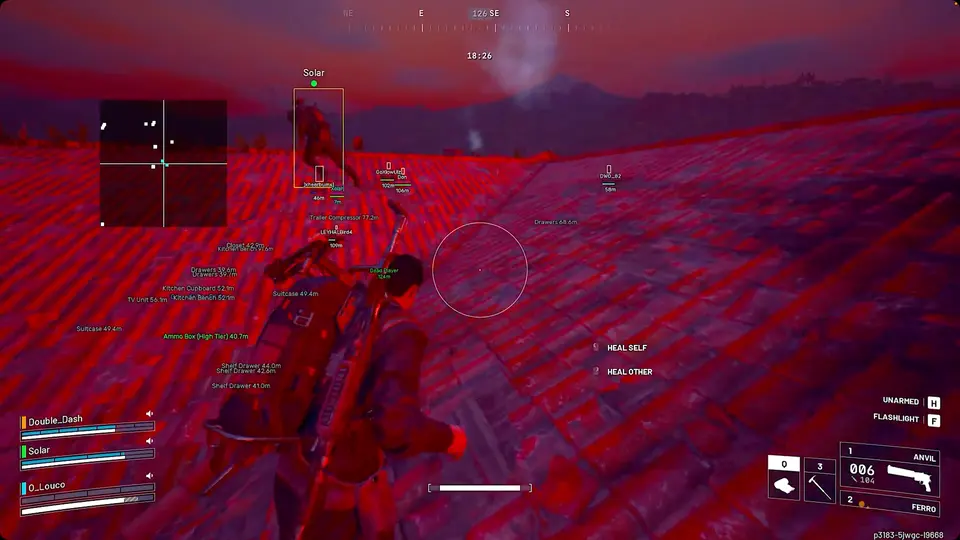
Entry-level Arc Raiders overlay with core ESP and smooth targeting — clean visuals without the full toolkit.
Xray is the starting tier for players who want readable ESP, loot visibility, and smooth targeting without the full combat automation stack. It keeps the overlay lightweight so you can focus on positioning and extractions.
Use Xray when you mainly need awareness — seeing raiders, loot value, and weak points — and plan to upgrade later if you want deeper aim or trigger tooling.
// Setup How to Get Started
- Complete checkout for instant delivery and download the loader.
- Disable conflicting overlays and run as administrator if prompted.
- Enable ESP categories you actually use — player boxes, loot filters, and FOV limits first.
- Save a low-noise config and test in a private session before stacking high-value extractions.
// Features What's Included
- Raider Visibility Check
- ARC Weakpoint Selection
- Targeting FOV
- Smooth Targeting
- Enable Overlay ESP
- Raider Box ESP
- Health Bar ESP
- Distance Readout
- Skeleton ESP
- Head Marker ESP
- Loot Value ESP
- Box Type (Square, Corner, 2D, 3D)
- Health Bar Position (Right, Left, Bottom, Above)
- Overlay Menu
- Save Configs
- Cloud-Sync Option
Tier FAQ
- Is Xray enough for solo extractions?
- For many players, yes. ESP and loot visibility cover most decision-making. Upgrade to Pro if you want aim assist and trigger tools in fights.
// Tiers
Compare Arc Raiders Cheat Tiers
Xray, Pro, and Private — full feature breakdown.
| Feature | Xray | Pro Popular | Private |
|---|---|---|---|
| Enable Aimbot | — | — | |
| Drone Aimbot | — | — | |
| Custom Aim Keys (2 Slots) | — | — | |
| Selectable Hitboxes (Head, Neck, Chest, Body) | — | — | |
| Hold Shift = Head Aim | — | — | |
| Aim Smoothing | — | — | |
| Custom FOV Circle | — | — | |
| Visibility Check | — | — | |
| Max Aim Distance | — | — | |
| Dead Zone Control | — | — | |
| Focus Bots / Teams | — | — | |
| Draw Dead Zone | — | — | |
| Player ESP | — | — | |
| Drone ESP | — | — | |
| Team ESP | — | — | |
| 2D Box ESP | — | — | |
| Names & Distance | — | — | |
| Health & Armor Bars | — | — | |
| Skeleton ESP | |||
| Weapon Display | — | — | |
| Item & Loot ESP | — | — | |
| Max ESP Distance | — | — | |
| 2D Radar Hack | — | — | |
| Radar Styles (Square, Circle, Custom) | — | — | |
| Show Players on Radar | — | — | |
| Show Drones on Radar | — | — | |
| Extraction Zone ESP | — | — | |
| ARC Patrol ESP | — | — | |
| Stream-Safe Mode | — | — | |
| Remaining Duration Display | — | — | |
| Language Switch (Chinese Supported) | — | — | |
| Direct Support Channel | — | — | |
| Enable Aim Assist | — | ||
| Aim Key Bind | — | ||
| Raider Visibility Check | |||
| Enable Trigger Assist | — | ||
| Trigger Key Bind | — | ||
| Trigger FOV | — | ||
| Show Trigger FOV | — | ||
| Enable Overlay ESP | |||
| Raider Box ESP | |||
| Fill Box ESP | — | ||
| Health Bar ESP | |||
| Distance Readout | |||
| Player Name ESP | — | ||
| Head Marker ESP | |||
| Threat Level ESP | — | ||
| Weapon ESP | — | ||
| Box Type (Square, Corner, 2D, 3D) | |||
| Health Bar Position (Right, Left, Bottom, Above) | |||
| Hostile Only Filter | — | ||
| Inactive Raider Check | — | ||
| Overlay Menu | |||
| Menu Theme Selector | — | ||
| Wireframe Gear View | — | ||
| Secure Boot Compatible | — | ||
| Save Configs | |||
| Cloud-Sync Option | |||
| ARC Weakpoint Selection | — | ||
| Targeting FOV | — | ||
| Smooth Targeting | — | ||
| Loot Value ESP | — |